API documentation
1 Deployment architecture
The general deployment architecture used for the MizoPol package is shown in Figure Figure 1 below.
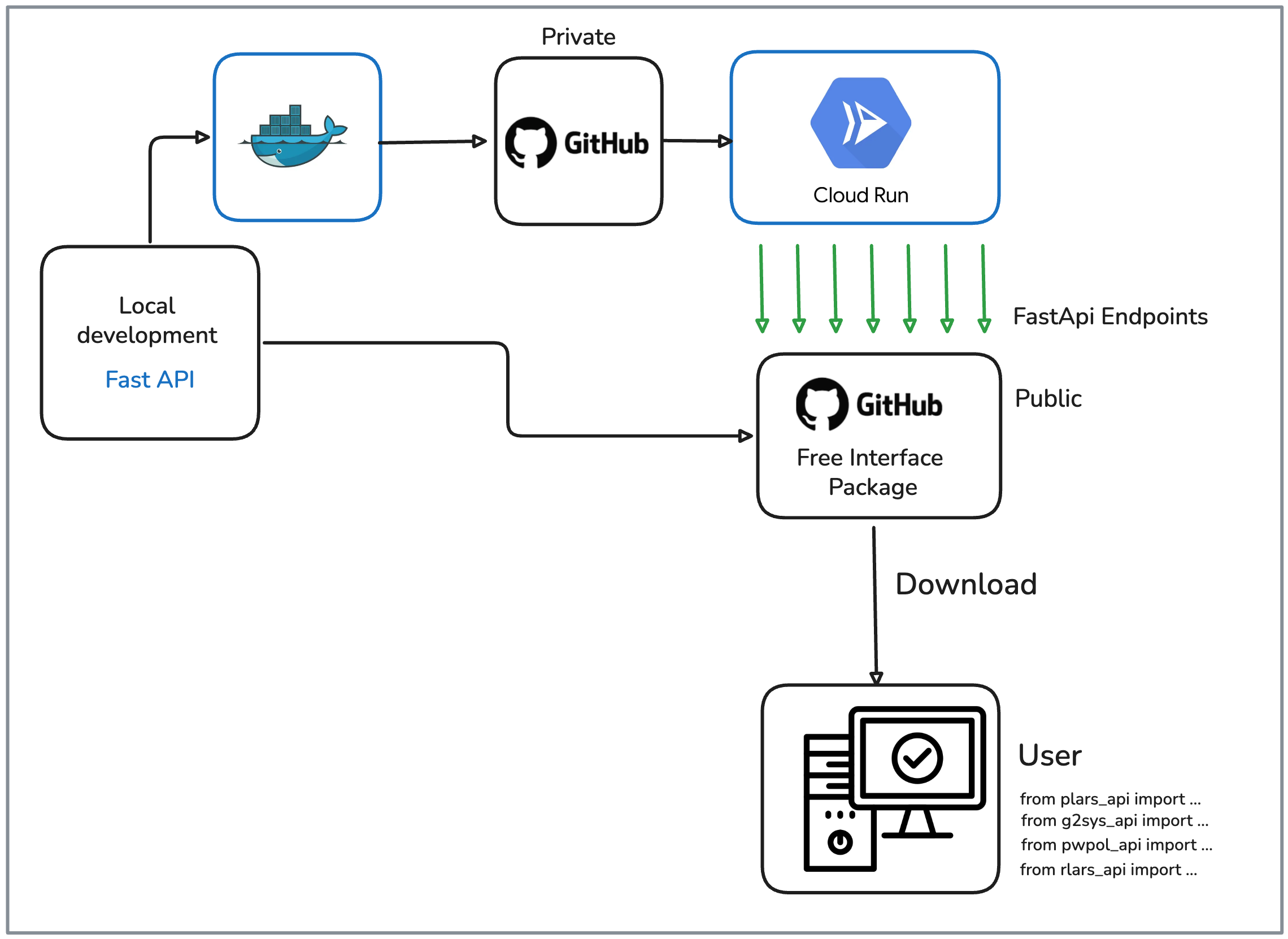
MizoPol package.
More precisely, a local continuously enriched features package is developed locally and periodically deployed on cloud via a docker-based images. The continuous deployment is done through a private Git-hub repository. This enables to deploy a set of endpoints that corresponds to the package exposed methods that are described in the following sections.
2 The mizopol interface module | installation
In order to use these endpoints while making total abstraction of the technicalities of the deployment, a module is developped and made freely downloadable from a public repository so that the endpoints be accessible from the user side.
The interface module will shortly be downloadble or cloned from the following public repository (I’m working on it):
https://github.com/mazenalamir/mizopol_api.gitOnce downloaded, the folder containing the interface module shows the following architecture
.
├── README.md
├── mizopol
│   ├── __init__.py
│   ├── __pycache__
│   ├── g2sys_api.py
│   ├── plars_api.py
│   ├── pwpol_api.py
│   ├── rlars_api.py
│   └── utils_api.py
├── pyproject.toml
├── test_g2sys.py
├── test_plars.py
├── test_plars_doc.py
├── test_pwpol.py
├── test_rlars.py
└── uv.lock
The components of this folder are the following:
- 1. The
MizoPolinterface modules folder -
This folder contains the modules that are designed to call the cloud deployed endpoints as shown in Figure Figure 1. For instance, in order to fit a
plarsmodel, the user would use the following import statement:
from mizopol.plars_api import fit - 2. A set of test python files
-
These files are provided as example of use of the available method in the
MizoPolapi. They cover the use ofplars,g2sys(scripting version not the streamlit one),pwpolandrlars. Notice however that these files do not necessarily explore all possible parameters setting. To this end, reading the API documentation provided in the next section is necessary to fully exploit the capabilities of theMizoPolpackage. - 3. The virtual environment uv utilities
-
This includes the
uv.lockand theproject.tomlfiles. These files enables an easy creation of the virtual environment through the command:
uv syncIt is possible that some of the test files make reference to dataset downloading. In such cases, the corresponding downloading instruction should be replaced by the user’s own files.
In the following section, the information needed to use the modules contained in the mizpol folder of the above shown architecture are detailed.